Welcome to the ACES job board and Editors for Hire directory
The ACES job board helps employers find editing professionals and members find new opportunities. The job board is visible to both members and nonmembers, but only ACES members can create a job seeker profile and save and apply for jobs. Anyone can sign up for job alerts.
The Editors for Hire directory is a member-only benefit that provides a place for ACES members to showcase their experience, skills, and services to potential employers and clients. Create a profile to highlight areas of specialty, availability, and upload your resume.
The job board and Editors for Hire are accessed from the same platform.
ACES reserves the right to reject or remove job postings and Editors for Hire directory profiles that do not meet the purpose or standards of the ACES job board.
Need help? If you have questions about the ACES job board, the Editors for Hire directory, your account, or your membership-related access, contact us at info@aceseditors.org.
Frequently asked questions
Who can use the job board? Do I have to be an ACES member?
Anyone can view the job board, but you need to be an ACES member to save and apply for jobs and be featured in the Editors for Hire directory.
Is the job board free?
Current ACES members have access to post jobs at no charge. Nonmembers and employers can post jobs for a fee: $50 for one job or $125 for a bundle of three jobs per year. Jobs are posted for 30 days.
What happens if my ACES membership expires?
Access to the platform is connected to your ACES membership. If your membership expires, your access to the job board and Editors for Hire will also expire until you renew your membership. The account won't be deleted, but you won't be able to log in.
Can I register with more than one email address?
Only one email address can be associated with a job seeker and employer account. If you are an ACES member, you must use the email address associated with your ACES membership. If an ACES member creates an employer account to post a job, you can use your same job seeker credentials.
I would like to post a job and be a job seeker? Is that allowed?
Yes, it's allowed but you will need to create two separate accounts to use each feature. However, you can use the same email address to create and manage both accounts.
What if I'm having trouble accessing my account?
ACES members must use the email address associated with their current ACES membership. If you have trouble, contact ACES at info@aceseditors.org.
Can I sign up for the Editors for Hire directory?
The Editors for Hire directory is only for ACES members and single sign-on is connected to a current membership.
What does the blue checkmark mean by someone's name?
A blue checkmark by a name indicates a current ACES member.
Can I format my bio description with bold, italics, or bullets?
Currently the platform doesn't feature formatting options, but the request has been shared with the developer. We can manually add extra spaces to help with readability or use dashes for bullet points.
Are there any discounts for posting jobs?
ACES members post jobs at no charge, even on behalf of their organization. Internships and volunteer jobs can be posted at no charge. To receive the discount code for those posts, please email us at info@aceseditors.org.
Can I give feedback about the job board?
Yes, we welcome your feedback. Email us at info@aceseditors.org.
How do I create a job seeker account?
Click the person icon in the top right corner of the job board homepage.
How do I search for jobs?
Anyone can browse and search the jobs posted on the ACES job board, but only ACES members can save and apply for jobs. Use the available search and filtering options to find positions.
Once you create your account, you can create a job seeker profile and make yourself visible to employers through the Editors for Hire directory (ACES members only).
How do I apply for a job?
The employer determines how candidates should apply when creating the job posting. The choices are clicking an "apply" button, applying through a link, or emailing the provided email address in the post. Review the individual listing for the employer's application instructions and follow those instructions to submit your application.
How do I sign up for job alerts?
Click "Subscribe" in the box on the homepage.
What if I only want to be a job seeker and do not want my profile in Editors for Hire?
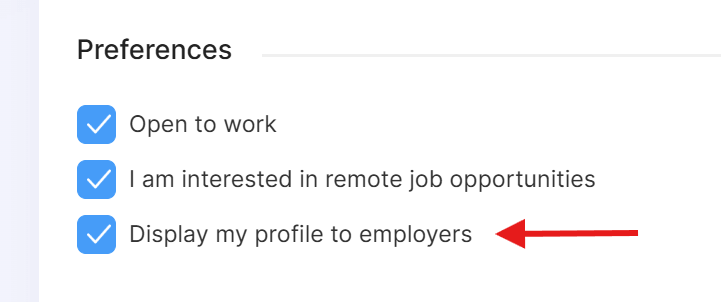
Log in to your job seeker dashboard and uncheck the box "Display my profile to employers." It is automatically checked when your account is created.
How do I create an employer account?
Click the briefcase icon in the top right corner of the job board homepage. The account creation is separate from a job seeker account.
How do I post a job?
- Click the "Post a job" button in the top right corner.
- Depending on how you log in, toggle the button for "Member pricing" or "Nonmember pricing."
Who can post a job?
Both ACES members and nonmembers can post jobs, but an account must be created to post. The account is separate from the job seeker account.
To post a job, an ACES member must use the same email address associated with a current ACES membership. However, in the job post, the option exists to have a different email for an application submission (if that option to apply is chosen).
What kinds of jobs can be posted?
The ACES job board is intended for opportunities relevant to editors and related professionals. Employers should provide accurate, complete information about the position, including responsibilities, qualifications, location or remote-work status, compensation when appropriate, and application instructions. Internships and volunteer roles are also welcome and can be posted at no charge. Email info@aceseditors.org for more information.
What if I'm an ACES member and would like to post a job on behalf of my employer?
That's fine. Your ACES membership gives you access to the free job-posting benefit, so you can post on behalf of your employer or organization.
How much does it cost to post a job?
Current ACES members can post jobs at no charge as a benefit of membership. The following fees are on the "post a job" page for nonmembers and employers:
- One job: $50. The job remains active for 30 days.
- Three-job bundle: $125. Post three jobs during a one-year period. Each individual job remains active for 30 days.
- Featured listing: $199. A featured job is highlighted in yellow to give it additional visibility.
- Internships and volunteer jobs: no charge. Email your job post for review so a discount code can be provided. You will still need to create an employer account to post. Email info@aceseditors.org.
What is the purpose of a featured listing?
A featured listing gives a job additional visual prominence on the job board. They are highlighted in yellow to help them stand out from other listings.
How long does a job remain posted?
Each individual job posting is active for 30 days.
For employers who purchase the three-job bundle, the three postings can be used during a one-year period, with each individual posting active for 30 days.
Can I edit my job posting?
Yes, manage your job postings through your account dashboard. You can update and change your listing as many times as you need to.
How do I manage my job posting and the applicants?
From your profile dashboard menu, you can view the jobs you've posted and update them, view applicant submissions and categorize them (interested, interviewing, hired, not interested), and view your billing and subscriptions.
Does ACES review job postings before they are published?
No. Job postings are automatically published and are not reviewed by ACES before they appear on the job board, with the exception of internships and volunteer roles. ACES will review an internship or volunteer role since it's a free posting and a discount code is shared upon approval. ACES reserves the right to reject or remove a job posting at any time.
What is the Editors for Hire directory?
The Editors for Hire directory is a member-only benefit to showcase professional experience to potential employers and clients by creating a profile, listing your specialties and availability, and uploading your resume.
How do I create my profile for employers to find me?
On the platform, click the person icon at the top right of the page, and select "Sign up" from the dropdown. Log in with the same ACES membership email. You must use that email as your login is connected to your ACES membership.
Can nonmembers create an Editors for Hire profile?
No. Editors for Hire is only available to current ACES members and is a member benefit.
How can I add keywords to my profile so I will come up in an employer's search?
The words in your bio description are the keywords the search feature draws from. One bio formatting option is to include separate lines with headings for an employer to easily learn about you. For example:
- Specialties: Copyediting, developmental editing, line editing
- Genres: Memoir, horror, LGBTQ+
- Additional services: Indexing, transcribing, graphic design
- Keywords: Memoir, finance, nonprofits
What if I only want to be a job seeker and do not want my profile in Editors for Hire?
In your profile, uncheck the box "Display my profile to employers." It is automatically checked when your account is created.